Security Dashboard
The Security Dashboard is the primary working view for analysts. It provides a real-time overview of security analytics, threat detections, ML-driven anomaly insights, and case activity across the environment.
The dashboard uses the ATT&CK Navigator and Insider Threats views accessible from the top navigation bar. The time range can be adjusted (default: Last 30 Days).
Overview & KPIs
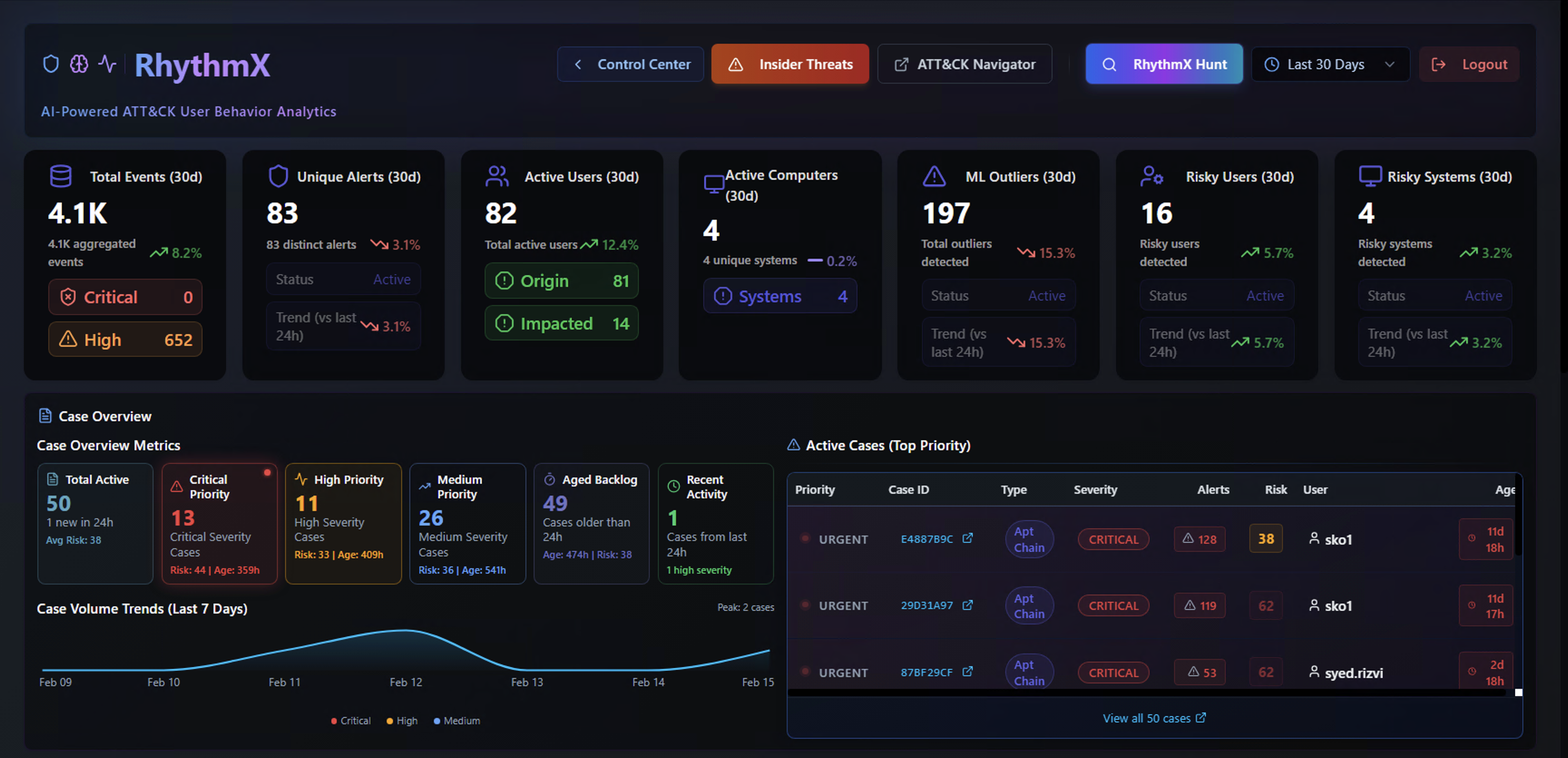
The top section displays key performance indicators for the selected time range:
| Widget | Description |
|---|---|
| Total Events | Total log events ingested, with aggregation count and trend |
| Unique Alerts | Distinct Sigma rule detections with status breakdown (Active) |
| Active Users | Users generating alerts, split by Origin (source of the activity) and Impacted (target of the activity) |
| Active Computers | Unique systems involved in detections |
| ML Outliers | Alerts flagged as anomalous by the ML engine |
| Risky Users | Users with elevated risk scores based on alert volume and severity |
| Risky Systems | Systems with elevated risk scores |
Case Overview
Below the KPIs, the Case Overview section shows:
- Total Active cases and their priority distribution (Critical, High, Medium)
- Aged Backlog — cases that have been open beyond expected resolution time
- Recent Activity — latest case updates
- Active Cases (Top Priority) — a ranked list of the highest-priority cases with case ID, type, severity, alert count, risk score, assigned user, and age
- Case Volume Trends (Last 7 Days) — a trend chart showing case creation over time, broken down by Critical, High, and Medium severity
Machine Learning Detected Activity
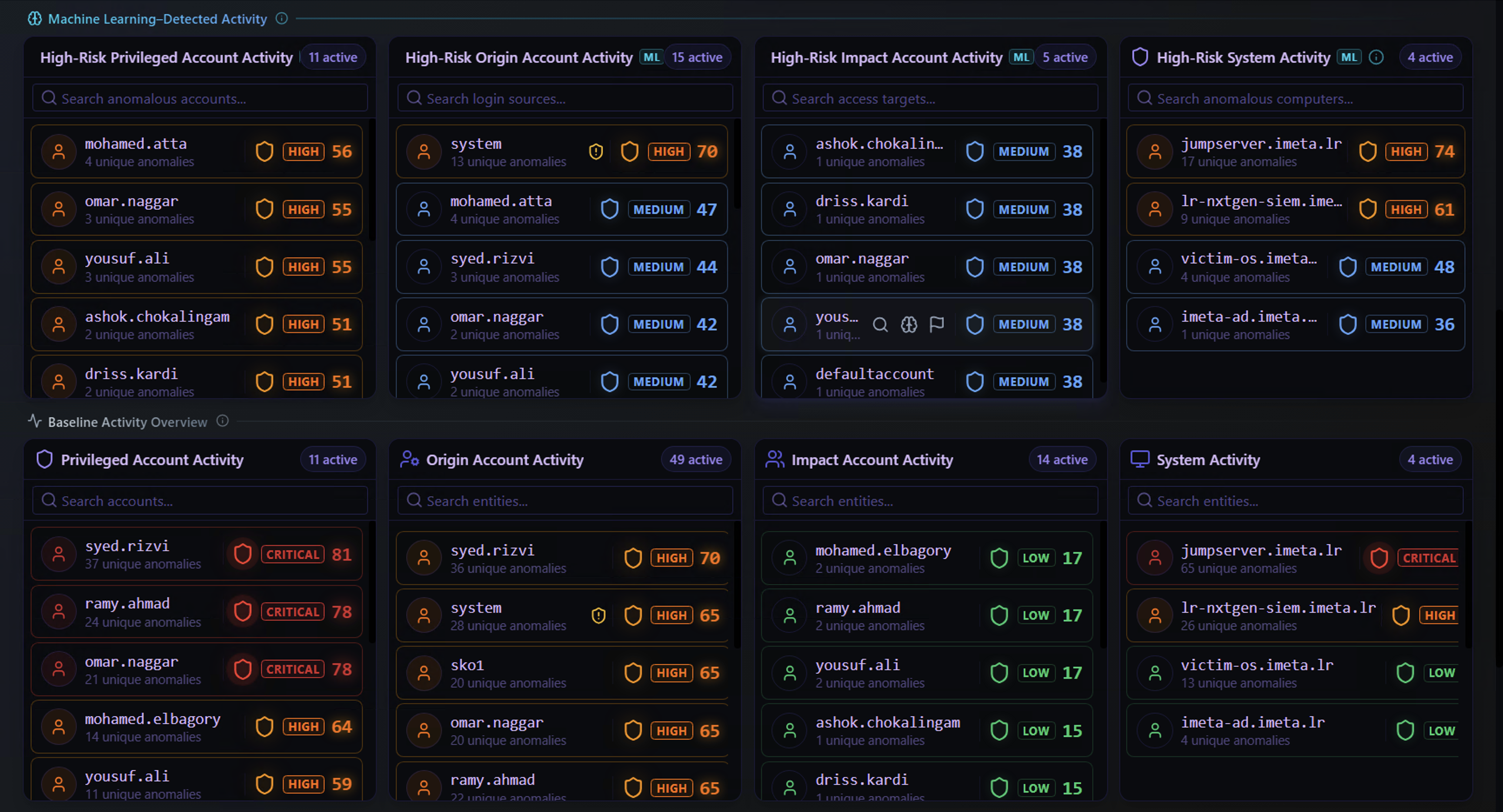
This section is split into two tiers — ML-Detected (High-Risk) at the top and Baseline at the bottom. Understanding the difference between these two tiers is critical for effective triage.
High-Risk Activity (ML-Detected)
These are entities where the ML engine has flagged anomalous behavior. The ML engine continuously builds a behavioral profile for each user and system. When an entity's activity deviates significantly from its established pattern, it is surfaced here.
An entity appearing in the ML-Detected section means: "This account or system is doing something it doesn't normally do."
Four panels break this down by entity role:
| Panel | What It Answers |
|---|---|
| High-Risk Privileged Account Activity | Are any privileged accounts behaving abnormally? These are the highest-risk entities because compromised privileged accounts can cause the most damage. |
| High-Risk Origin Account Activity | Which source accounts are generating unusual alert patterns? These are the accounts performing the suspicious actions. |
| High-Risk Impact Account Activity | Which accounts are being targeted by anomalous activity? These are the accounts on the receiving end — potential victims of an attack. |
| High-Risk System Activity | Which systems are exhibiting behavior outside their normal baseline? A server that suddenly generates new types of alerts could indicate compromise. |
Each entity shows the number of unique anomalies and the severity level from the triggering Sigma rules. The combination of ML-flagged + high-severity Sigma rule is the strongest signal for investigation.
Baseline Activity Overview
The Baseline section shows the same entity categories but for normal, expected activity. These entities have triggered Sigma alerts, but the ML model considers their behavior within the normal range for that entity.
An entity appearing in the Baseline section means: "This account or system triggered alerts, but the pattern is consistent with its usual behavior."
Why this matters: By comparing the ML-Detected and Baseline panels side by side, analysts can immediately distinguish between:
- Genuine anomalies — an entity appears in ML-Detected but not in Baseline (new, unexpected behavior)
- Escalating threats — an entity appears in both, but with higher severity in ML-Detected (normal activity plus new anomalous activity)
- Business as usual — an entity appears only in Baseline (alert activity is within expected patterns)
Top Attacks, Rare Attacks & ML Outliers
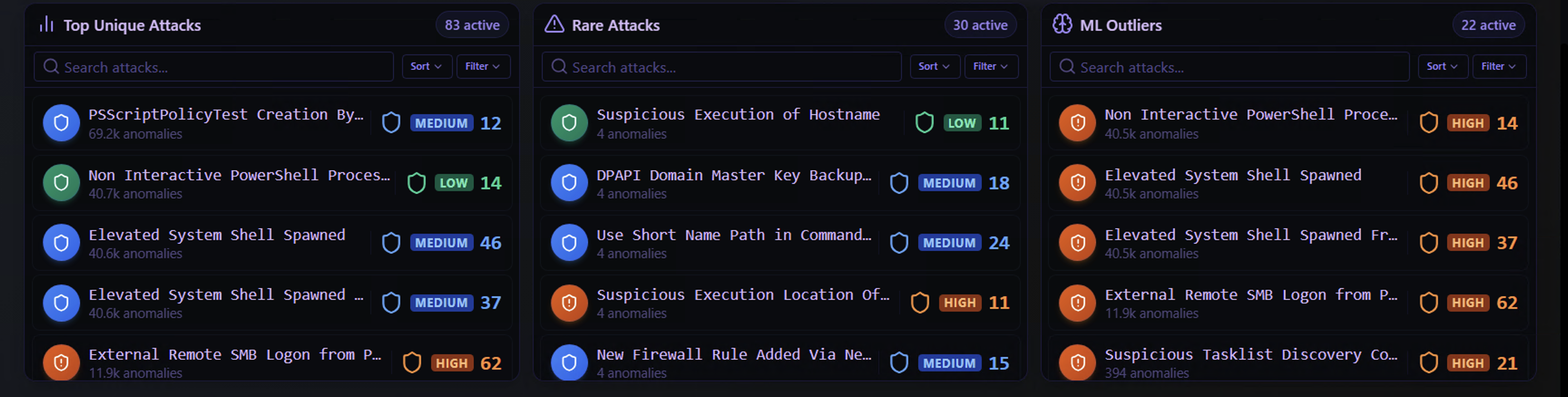
The bottom section provides three distinct views of detection activity. Each answers a different question:
Top Unique Attacks
Question: "What are the most common threats in my environment?"
These are the Sigma rules that have triggered most frequently across the environment. They are ranked by anomaly count and show severity level.
Top attacks are useful for understanding the overall threat landscape — what types of attacks are most prevalent. However, high frequency can also indicate noisy rules that may need tuning or false positive management.
Rare Attacks
Question: "What unusual or targeted activity has been detected?"
These are Sigma rules that have triggered very few times. Rare detections are often the most valuable for investigation because they may indicate:
- Targeted attacks — an adversary using techniques specific to your environment
- Novel techniques — attack methods not commonly seen in your environment
- Early-stage compromise — initial access or reconnaissance that hasn't escalated yet
A rare attack at high severity should be investigated immediately.
ML Outliers
Question: "What does the ML model think is most suspicious?"
These are alerts where the ML engine specifically flagged the behavior as anomalous at the individual alert level. Unlike the ML-Detected Activity panels above (which group by entity), this view lists the specific Sigma rules that generated ML-flagged alerts.
An alert appearing here means the ML model determined that this particular detection, in this particular context, is unusual — even if the same Sigma rule fires regularly for other entities.
How to Use All Three Together
| Scenario | What It Means | Action |
|---|---|---|
| An alert appears in Top Attacks only | Common, expected detection | Review for false positive tuning |
| An alert appears in Rare Attacks only | Uncommon detection, not ML-flagged | Investigate — could be targeted |
| An alert appears in ML Outliers only | Common rule, but unusual context | Investigate — ML sees something unusual |
| An alert appears in Rare Attacks AND ML Outliers | Uncommon detection AND ML-flagged as anomalous | Highest priority — investigate immediately |